Live Default Values
QField supports live updating of default attribute values when editing features. Modifying one attribute value automatically updates dependent attribute fields configured with dynamic default expressions. For example, selecting a scientific species name can automatically populate a common species name or retrieve a corresponding image.
Configuring Live Default Values
Project Manager
Configure live default values in QGIS layer properties by combining default value expressions with the Apply default value on update setting.
Workflow
- In QGIS, navigate to Vector Layer Properties... > Attribute Form.
- Select the target field that should update automatically (such as
photos). - Enter your dynamic expression in the Default value field.
- Enable Apply default value on update.
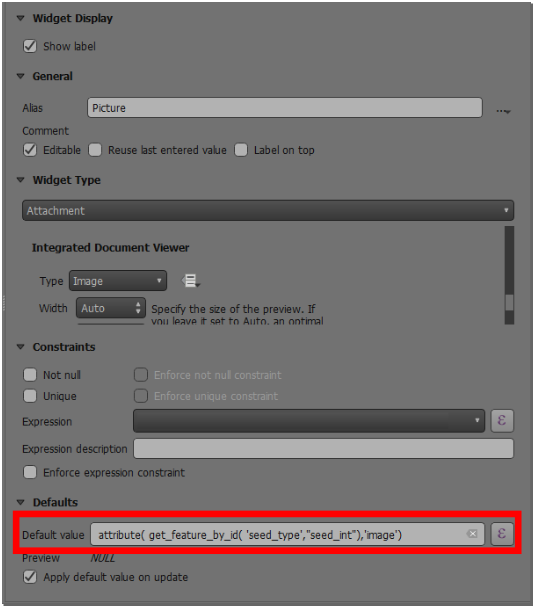
Live default value image configuration - Select the triggering attribute field (such as
plant_species) configured with a Value Relation or Value Map widget. - Configure the widget properties and default expressions as needed.
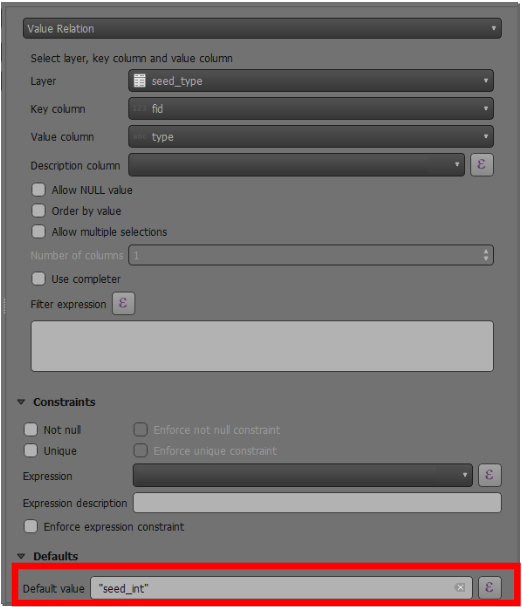
Live default value relation configuration - Click OK and save your project.
Usage Example
Feldarbeit
When editing feature attributes in QField, changing a value in a parent field immediately re-evaluates expressions and updates dependent default fields in real time.