Live default value
QField is supporting the "live" updating of default attribute value when editing features. This means, when changing one value in an attribute another automatically adjusts. Examples for this could be species names that are both recorded with the original species name and the common name.
Flux
Configuration
Desktop preparation
In this example, the image will automatically update when a different plant_species is chosen.
- Direct to the layer properties, where you want to set the updating value field.
- Go to the 'photos' field and add the following expression into the default value.
-
Toggle the apply default upon update.
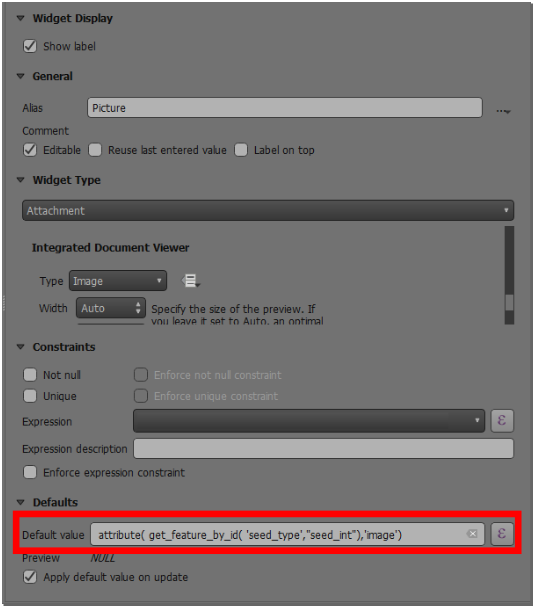
live default value image -
Go to the plant_species field where your value relation is set as a widget type.
-
Add the following expression as shown below into the default value.
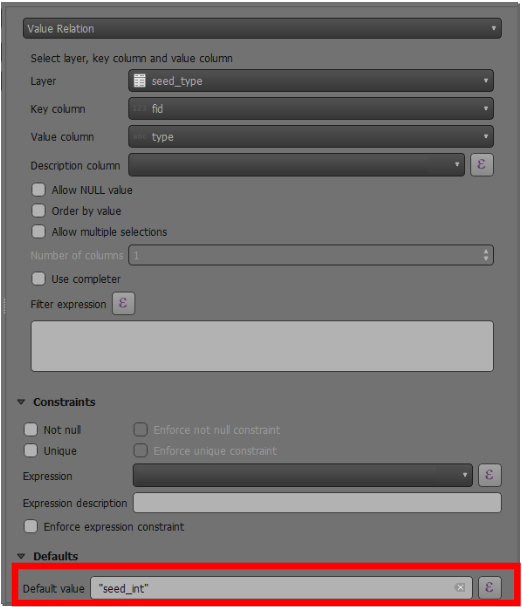
live default value relation -
Press Ok and save.
Example
In the video below there is an example of "live" default value updates when editing features on QField.